Dynamic CPU Power Management with cpufreq and schedutil
February 23, 2026
Blog

We are looking at how cpufreq and its most sophisticated governor, schedutil, allow the kernel to take advantage of Dynamic Voltage/Frequency Scaling (DVFS).
cpufreq generally adopts the mantra “work when there is work to be done”. In other words, when there is a “demand” on the system, then the kernel will do its best to give these tasks the CPU time they require to perform the task. However, whenever the demand is less than 100% of the maximum CPU capacity, cpufreq will attempt to opportunistically save energy by slowing down some or all of the cores.
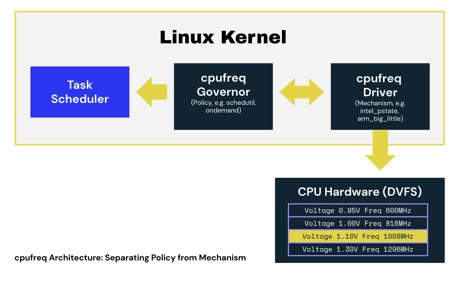
To simplify its design, cpufreq combines hardware-specific cpufreq drivers with generic cpufreq governors. The split allows mechanism and policy to be separated:
- cpufreq drivers provide the mechanism to switch between different DVFS operating points and are typically partially- or fully-customized to a specific system-on-chip (SoC). They are also responsible for describing the available operating points, allowing the governor to make decisions.
Different drivers invoke DVFS changes in different ways. Some directly manipulate the registers of power control hardware, whilst others work by sending messages to co-processors or supervisor-mode firmware requesting a change of power state. The thing typical cpufreq drivers (outside the x86 eco-system, see below) have in common is that they do what they are told and are not responsible for making decisions about what operating point to adopt.
- cpufreq governors provide the policy and are responsible for choosing the correct operating point from a list provided by the cpufreq driver.
Some governors are very simple. For example, the performance and powersave governors will, respectively, run the CPU as fast or slow as possible. However, the more flexible governors, such as ondemand, conservative, and schedutil, seek to estimate the current CPU load and will adjust the CPU frequency to match. For example, during media playback, the CPU wakes up to decode the audio and video but then goes to sleep until the video hardware is ready to accept the next frame. This may require only 50% of CPU capacity, so the ideal governor would select an operating point that is approximately half of the maximum frequency.
schedutil stands apart from other complex governors and uses data captured by the scheduler to make decisions.
On Intel systems, it is common for a cpufreq governor to be integrated into the cpufreq driver. On modern Intel systems, the selection of the power state is usually made by hardware. Similar designs can also exist on Arm and RISC-V platforms, but they are unusual. Hardware-managed designs benefit from low-latency feedback on current processor demand that is provided by special-purpose monitoring hardware. Having said that, hardware must rely on low-latency feedback; it does not benefit from the insight into the future provided by the scheduler (and utilized by schedutil to improve decision making).
How does the schedutil governor decide what frequency to run at?
Historically, cpufreq governors used relatively crude observations of the system and then applied heuristics to determine what frequency to run at.
For example, both the on-demand and conservative governors both work by observing the idle time on each CPU since they were last invoked. This allows them to speed up busy CPUs and slow down quiet ones. Both offer a variety of controls to tune their heuristics to get the desired result. These include things like how frequently they trigger and what thresholds should be met before enacting a change. There are two well-known issues with this approach:
- It is difficult for them to handle tasks with bursty CPU demand. They simply assume that what happened since they were last invoked will continue to happen. This does not work well on systems with frequently changing loads.
- They are difficult to tune because there is an indirect relationship between the desired behaviour and the tuneables available. Seesaw tuning is especially common, where one end goes up (one use-case improves), but the other end goes down (a different use-case regresses).
This situation changed with the introduction of the schedutil governor. As the name hints, this governor uses the scheduler’s CPU utilization measurements to make decisions. These measurements are gathered on a per-task basis and provide a better basis to predict future load than the simplistic aggregate view of utilization available to the on-demand and conservative governors.
The scheduler knows which task is assigned to which CPU and maintains a CPU utilization estimate. This allows schedutil to sum the utilization of all scheduled tasks to give an estimated utilization for the CPU. From there, a simple linear formula is used to select the operating point. In the presence of varying loads, the per-task estimated loads are typically more stable than the simplistic whole system view, which cannot model bursts of activity effectively.
For example, let’s think about a system that is:
- Playing a movie - This system will be partially loaded with lots of idle time and will maintain a similar level of CPU usage for the whole movie. The load estimation for each task involved in playback will reflect the fact that these tasks do not require all the available CPU.
- Browsing the web - When the user reads the page, the browser will typically sleep with a CPU load close to zero, waiting for user input. When the user clicks on something, it wakes up and needs lots of resources to run JavaScript before it goes back to sleep. The load estimation for the browser tasks will reflect their bursty nature (e.g., when runnable, they need lots of CPU).
schedutil not only copes gracefully with both the above cases individually, but it is also able to handle both concurrently!
There are, of course, many different ways to estimate load. We can’t go into every detail here except to note that the quality of these estimates is clearly important and that there have been several different approaches tried, both in the kernel tree and out-of-tree over the years, all of which lead to the current design.
Now that we understand how schedutil makes decisions, let's look at how to tune these systems to reduce power consumption in real-world applications.
Tuning cpufreq and schedutil for Lower Power Consumption
One of the key innovations offered by schedutil was the removal of heuristics. Heuristics typically take shortcuts and do not completely model the problem to be solved. Tuneables often go hand-in-hand with heuristics as a way to bias a heuristic to better match a particular use-case. schedutil replaces heuristics with a full model of all runnable tasks within the system, together with the estimated utilization of each task. As a result, schedutil differs from some of its predecessors, and the governor itself doesn’t provide any tuneables to bias its decisions.
None of this means that schedutil cannot be tuned. Instead, there are two combinable strategies that can be adopted:
- Limit the choices schedutil can make by making certain operating points unavailable (this approach also works with other governors)
- Use knowledge of the system to interfere with the estimated utilization.
These approaches are discussed below.
Cull inefficient operating points
It is possible for the clock hardware in some designs to offer operating points that are not useful because a faster OPP is more efficient. In some cases, it is better to run at a faster speed, complete the calculations quicker, and then enter an idle state that causes power-gating.
In most Arm and RISC-V systems, the table of operating points is found in the device tree along with information to estimate the energy cost of each state. Normally, the SoC vendor will have culled inefficient operating points for you, but if you have an early release (or you work for a SoC vendor), there is no downside to removing inefficient operating points from the device tree if you find any.
Aside: Why does hardware provide inefficient operating points in the first place?
Energy usage can be approximated as the sum of static and dynamic leakage. Static leakage is the current consumed whenever a circuit is powered and exists because the insulation layers within the silicon chip are not perfect. It is voltage-dependent but is independent of clock speed. In contrast, dynamic leakage is the energy lost when charge (and the 0s and 1s that charge represents) is moved around the chip; this is both voltage and frequency-dependent.
As manufacturing processes shrink, the relative costs of static and dynamic leakage have changed. Twenty years ago, static leakage was often considered to be negligible, but today it cannot be ignored when making power management decisions. Static leakage explains why some low-frequency operating points are less efficient than a higher frequency neighbour. If there is a lot of static leakage, the best way to reduce power is by completing calculations quickly and entering an idle state that gates the power and therefore reduces the static leakage costs.
These carefully balanced factors can make it difficult to accurately predict energy usage, so hardware is sometimes designed to be flexible on the assumption that inefficient operating points, if they exist, will never be used.
Frequency Clamps
Frequency clamps provide upper and lower limits for the CPU clock frequency. Upper limits prevent the system from adopting the fastest (and least energy efficient) operating points. The upper limit can be set using scaling_max_freq values in sysfs. On devices that have multiple CPU clusters with independent DVFS selection, there will be multiple instances of this file in sysfs. Take a look at /sys/devices/system/cpu/cpufreq on a running system to see what policies your system provides.
Once set, schedutil will no longer use higher frequencies (nor would any other cpufreq governor). Frequency clamping, which is a form of deliberate underclocking, reduces the maximum performance of the whole system. If therefore only makes sense to apply this tuning when this reduced performance is acceptable.
Frequency clamping is a great way to implement “battery saver” modes on phones and laptops. It can also be used in modal systems where the current operating mode is known not to require all available CPU resources.
In some cases, it may even be appropriate to enable frequency clamping permanently! Permanent frequency clamps are appropriate for battery-operated embedded systems where the CPU is overspecified for the mission. This typically occurs when a SoC with a powerful CPU is selected for a particular application because the on-chip peripherals are necessary for the use case. That means the system may not need a powerful CPU, but it got one “for free” along with the rest of the SoC.
Utilization Clamps
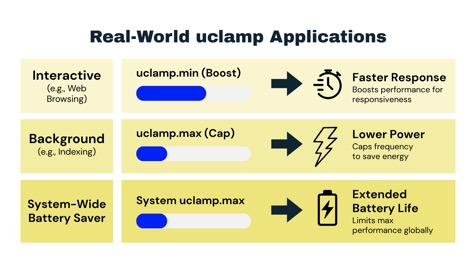
Utilization clamps (uclamp) allow the userspace to force a lower or upper bound on the estimated utilization of a task or a group of tasks. uclamps are used to bias schedutil decisions either to improve performance or to make it less likely schedutil will select the highest (and least energy efficient) operating points.
- Lower bounds are useful for performance boosting. In particular, it can be used to boost the apparent utilization of interactive tasks. When a task clamps at the lower bound, then schedutil adopts a higher operating point than it would otherwise. This imposes a greater energy cost but will also improve the time-to-completion, which makes interactive applications more enjoyable to use.
- Upper bounds are great for tasks that require lots of CPU bandwidth, but no one really cares how long it takes to complete. These tasks are typically CPU-expensive non-interactive tasks, for example, regenerating an index, processing photos, housekeeping, etc. Such tasks can be achieved at a lower energy cost by adopting a more efficient operating point whilst still allowing other tasks to transiently appear and demand the full capability of the CPU.
Both bounds are expressed as a ratio on the scale of 0 to 1024 (where 1024 is the maximum capacity of the fastest CPU in the system).
For simple systems, uclamps can be supplied on a per-task basis (CONFIG_UCLAMP_TASK). For example, consider a system that is largely interactive, but there are a small number of CPU-intensive background tasks causing excessive power draw. Applying an upper bound to these CPU-intensive tasks prevents them from causing the CPU to adopt the highest (and least energy efficient) operating points.
For more complex systems, a grouped approach (CONFIG_UCLAMP_TASK_GROUP) may be easier to manage. Linux systems allow tasks to be collected hierarchically into control groups (cgroups). When a process spawns new tasks, they will belong to the same parent cgroup, allowing more complex multi-threaded applications to be managed collectively.
For example, on a system managed by systemd, each service is separated into its own control group, allowing services that consume excessive power to be deprioritized. On our example system, the control group for the CUPS printer management service is represented as a directory within sysfs. Sysfs presents each control as a file, meaning to set the utilization clamp for the upper bound, we write the desired utilization to /sys/fs/cgroup/system.slice/cups.service/cpu.uclamp.max. Setting the upper bound will hierarchically affect all CUPS tasks (including any rasterizers that are spawned by printer drivers to render content) and can be used to hold the CPU in a more energy-efficient operating point during printing.
At the most granular level, utilization clamps can be applied across the entire system. The upper bound, found in /proc/sys/kernel/sched_util_clamp_max, provides an effect similar to frequency clamping. In contrast to frequency clamping, which uses real hardware units, utilization clamps allow the limit to be expressed as a ratio rather than being set in hardware-specific units. For example, on all hardware, 768 is 75% of the maximum capacity. This makes utilization clamps less direct and likely less precise, but allows generic operating systems (such as the one on your laptop) to implement portable battery saver modes without specific knowledge of the underlying hardware. For embedded systems, either approach is valid and could be influenced by how many different hardware devices your software targets.
With the three different granularities, utilization clamps provide a powerful set of tools to allow userspace to describe to the kernel the performance that the currently active use-cases require. Upper bounds allow userspace to reduce power consumption for use-cases that don’t need the CPU to run at its highest operating points, whilst lower bounds can be used to guarantee performance for sensitive workloads, allowing aggressive power management strategies to be pursued system-wide.
Daniel Thompson is a principal software engineer at RISCstar Solutions, a software services company that works wherever open-source software meets modern RISC hardware. Daniel has spent his entire career working in and around embedded operating systems, working on everything from RTOS to powerful Linux-based edge servers. He is an experienced trainer and a specialist in using debug and observability tooling to tune real-time systems. He currently spends most of his time helping RISCstar customers get the performance they need from their hardware. He is also a Linux kernel maintainer working on the kernel debugger and backlight.

Daniel Thompson is a principal software engineer at RISCstar Solutions, a software services company that works wherever open-source software meets modern RISC hardware. Daniel has spent his entire career working in and around embedded operating systems, working on everything from RTOS to powerful Linux-based edge servers. He is an experienced trainer and a specialist in using debug and observability tooling to tune real-time systems.